Running functionalizer
In the most simple case you just want to run functionalizer in one of three modi:
Structural (command line argument
--s2s) runs basic filtering only viaBoutonDistanceFilterandSynapseProperties.Functional (command line argument
--s2f) produces a circuit ready for simulation by the means ofBoutonDistanceFilter,TouchRulesFilter,ReduceAndCut, andSynapseProperties.Gap-Junctions (command line argument
--gap-junctions) usesSomaDistanceandGapJunctionto produce a circuit based on gap junctions.Merging (command line argument
--merge) with no active filters to merge multiple previous executions of functionalizer.
Custom lists of filters can be run with the --filters command line
option, separated only by commas (,). Note that any trailing Filter
should be omitted from class names.
File Conversions
Input Data
The touch files need to be in parquet. The module includes binaries to convert the touchdetector output:
$ module load parquet-converters
$ touch2parquet
usage: touch2parquet[_endian] <touch_file1 touch_file2 ...>
    touch2parquet [-h]
$ ls
touches.0 touchesData.0
$ mkdir parquet; cd parquet
$ touch2parquet ../touchesData.*
[Info] Converting ../touchesData.0
$ ls
touchesData.0.parquet
For a quicker conversion, use an MPI-enabled version:
$ module load parquet-converters
$ salloc -Aproj16 -pinteractive -t 8:00:00 -N1 -n42
…some SLURM/shell output…
$ srun --mpi=pmi2 touch2parquet ../touchesData.0
[Info] Converting ../touchesData.0
$ ls
touchesData.0.parquet   touchesData.1.parquet   touchesData.2.parquet   touchesData.3.parquet
touchesData.10.parquet  touchesData.20.parquet  touchesData.30.parquet  touchesData.40.parquet
touchesData.11.parquet  touchesData.21.parquet  touchesData.31.parquet  touchesData.41.parquet
touchesData.12.parquet  touchesData.22.parquet  touchesData.32.parquet  touchesData.4.parquet
touchesData.13.parquet  touchesData.23.parquet  touchesData.33.parquet  touchesData.5.parquet
touchesData.14.parquet  touchesData.24.parquet  touchesData.34.parquet  touchesData.6.parquet
touchesData.15.parquet  touchesData.25.parquet  touchesData.35.parquet  touchesData.7.parquet
touchesData.16.parquet  touchesData.26.parquet  touchesData.36.parquet  touchesData.8.parquet
touchesData.17.parquet  touchesData.27.parquet  touchesData.37.parquet  touchesData.9.parquet
touchesData.18.parquet  touchesData.28.parquet  touchesData.38.parquet
touchesData.19.parquet  touchesData.29.parquet  touchesData.39.parquet
Output Data
Within an allocation, the following command will convert all parquet files present in the functionalizer output directory, and convert them to a edges.sonata file:
$ module load parquet-converters
$ salloc -Aproj16 -pinteractive -t 8:00:00 -N1 -n42
…some SLURM/shell output…
$ srun --mpi=pmi2 parquet2hdf5 \
             circuit.parquet \
             edges.h5 \
             EDGE_POPULATION
The name EDGE_POPULATION will be used in the output file.
Small executions on a single node or machine
The shorthand fz command is available to run functionalizer on a single machine
without starting a full Spark and/or Hadoop cluster.
Executing functionalizer on the cluster
For all but the smallest executions on the order of a thousand cells, functionalizer should be
run on a dedicated Apache Spark cluster.
For SLURM-based clusters such as BlueBrain5, the functionalizer command will start an
Apache Spark cluster within a SLURM allocation and launch a specified program to run on
said cluster, when launched with srun.
By default, it will also provide a Hadoop Distributed File System (HDFS)
cluster that will accelerate operations that have a strong impact on
parallel file systems used to MPI loads.
To turn off the startup of HDFS, provide the -H flag to functionalizer.
Warning
When using SLURM to launch the cluster, please ensure that only one
process is launched per node (--ntasks-per-node=1), and that sufficient
cores will be available to the job (--cpus-per-task=36 or =72).
The script functionalizer will start one Spark worker per task, and each
worker will attempt to allocate all CPUs assigned to the allocation on
the node.
More than one worker per node will result in oversubscription and
resource shortage!
For optimal performance, the Spark functionalizer should be run on a cluster. Within a SLURM allocation, the following can be used to start up both a Spark and a HDFS cluster:
module load archive/2024-XY functionalizer
export BASE=/gpfs/bbp.cscs.ch/project/proj12/jenkins/cellular/circuit-1k/

export CONFIG=$BASE/circuit-config.json
export RECIPE=$BASE/bioname/recipe.json
export TOUCHES=$BASE/touches/parquet/*.parquet

cd $MY_OUTPUT_DIRECTORY  # For the user to set!

# Rather than using salloc, functionalizer may also be called within a script
# submitted to the queue via sbatch.
srun -Aproj16 --ntasks-per-node=1 -Cnvme -N2 --exclusive --mem=0 \
    dplace functionalizer \
                 --s2f \
                 --output-dir ${PWD} \
                 --circuit-config ${CONFIG} \
                 --recipe ${RECIPE} \
                 ${TOUCHES}
Note
The functionalizer command will create auxilliary directories in the current
working directory, which needs to be on a shared file system to work on
allocations with more than one node.
These directories include one named _cluster, where logs and temporary
configurations are stored.
The user is also responsible for removing this directory after a possible
analysis of the execution.
Re-generating Synapse Properties of SONATA Files
functionalizer can also be used to re-generate synapse properties for SONATA files, e.g., from the projectionalizer. When using SONATA input, the edge population needs to be specified, too. The following demonstrates an execution as above, but replaces the input Parquet by SONATA and runs only the synapse properties:
export CONFIG=$BASE/circuit-config.json
export RECIPE=$BASE/bioname/recipe.json
export EDGES=$BASE/edges.h5
export EDGE_POPULATION=default

salloc -Aproj16 --ntasks-per-node=1 -Cnvme -N2 --exclusive --mem=0 \
    srun functionalizer \
                 --output-dir ${PWD} \
                 --circuit-config ${CONFIG} \
                 --filters SynapseProperties \
                 --recipe ${RECIPE} \
                 ${EDGES} ${EDGE_POPULATION}
Merging functionalizer Executions
When merging previous executions of functionalizer, node files, a recipe, and the morphology storage do not have to be provided. This shortens the execution to e.g.:
export TOUCHES=$BASE/touches/parquet/*.parquet

salloc -Aproj16 --ntasks-per-node=1 -Cnvme -N2 --exclusive --mem=0 \
    srun functionalizer \
                 --output-dir=${PWD} \
                 --merge \
                 first/circuit.parquet second/circuit.parquet
Warning
Note that the files used as inputs should be from non-overlapping runs of TouchDetector or `functionalizer`.
SLURM Allocation Size
To be able to estimate the size of a SLURM allocation on BB5, the following graph may be of use:
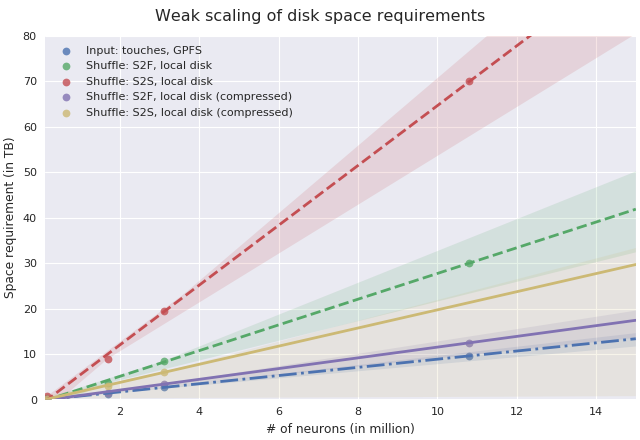
Disk space needed for shuffle data as of summer 2018.
Since the nodes in UC4 each have 2TB of local SSD space available, and compression is enabled by default, the shuffle data alone will require about 10 nodes when functionalizing 11 million neurons (S2S, compressed). It is recommended to allow for additional space due to the checkpoints that functionalizer will save during the execution, maybe 3-5 times the size of the input data (drawn dash-dotted), here 32 nodes should suffice to successfully functionalize 11 million neurons.
As the underlying data for this estimation may change frequently, please follow the instructions in the Debugging section to monitor a test run and adjust resources as needed.
Further Information
The following command should print up-to-date information about the usage of
functionalizer:
$ functionalizer --help